 Tirangaapplicationlogin.com

Tiranga Game at a glance
| Search used here | tiranga application login |
|---|---|
| Form parts | Two tabs, password, two helpers |
| Install required | None; it is a browser form |
| Phone code on this form | No, that is on Register |
| New player route | Register first |
| Form noted on | 8 October 2026 |
Application, app or site: the same form
Whether you call it the Tiranga application or the Tiranga app, the login you reach from here is the same browser form. No APK file or app comes from this site. Its Login button opens the form through a referral link, and nothing is installed along the way.
The form, part by part
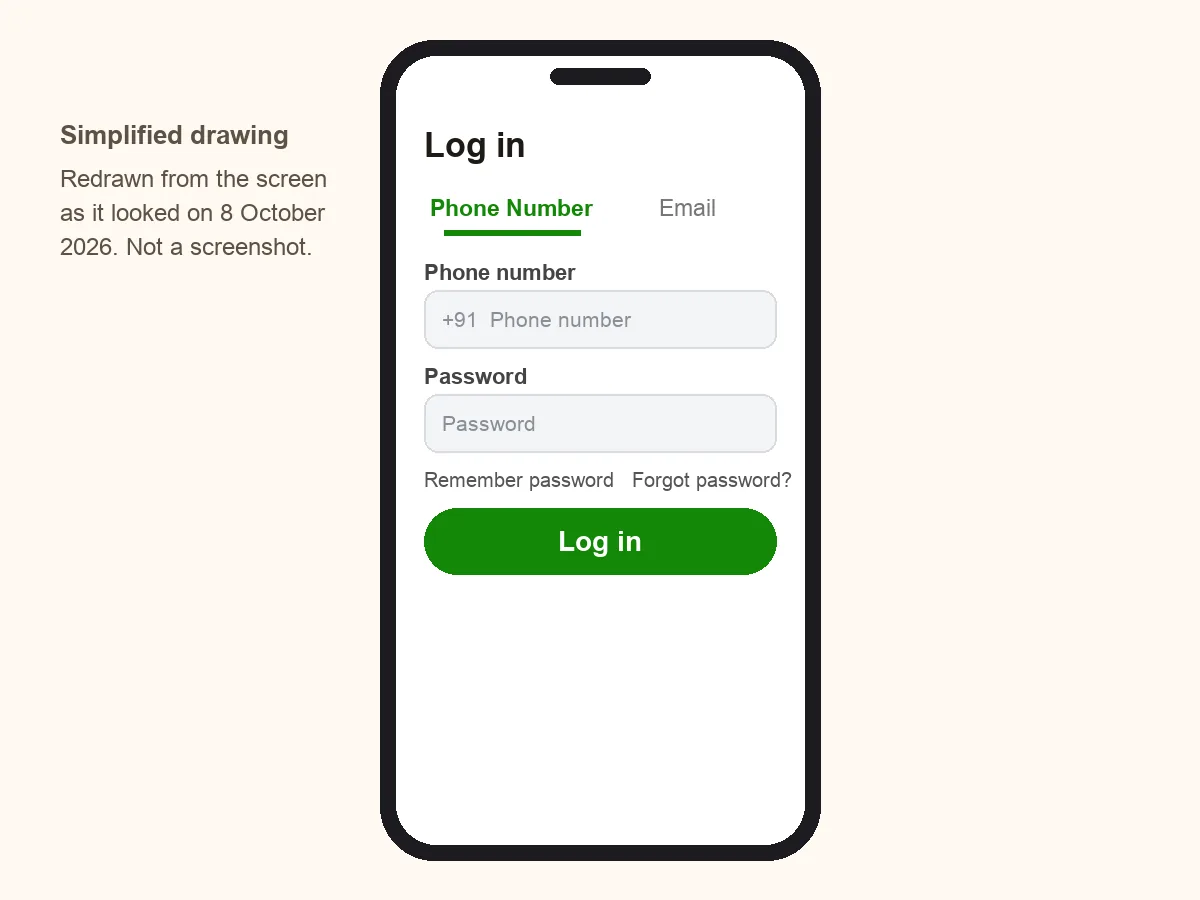
- Phone Number tab: the usual choice, since registering starts with your mobile number.
- Email tab: used when an email address is part of the account.
- Password: the one you chose in Set password.
- Remember password: a tick box meant for your own phone.
- Forgot password?: the reset link.
The Send button is on the other form
People often look for a code on the tiranga application login. The Verification Code field and its Send button sit on the register form and are used when you join. Signing in afterwards needs only your tab choice and your password.
Slips this form will not forgive
- An email typed into the Phone Number tab.
- A password with an extra capital letter.
- A space pasted in front of the number.
Fix these before reaching for Forgot password?, which is meant for a password you truly cannot recall.
Registering before the first login
The register form asks for a phone number with +91 India, a Verification Code (tap Send to receive it), Set password, Confirm password and an optional invite code. Once it is done, come back to the login form described above.
After the form: outside our notes
Our check on 8 October 2026 ended at these forms, so this page names no games. Set a firm spending limit before you sign in, whatever you find inside, and leave when it is reached. If the screens no longer match these notes, the screens are right and these notes are out of date.
Tiranga Application Login, Read Like a Form: common questions
Is the tiranga application login different from the app login?
No. It is one browser form, whatever name you give it.
Do I need a code every time I sign in?
Not according to our notes. The code was part of registering.
What does Remember password do on a shared phone?
It can let the next person in. Leave it unticked unless the phone is yours.
What if I cannot remember which tab I used?
Try Phone Number first, as the register form starts with a mobile number, then try Email.
Does this site offer a Tiranga application file?
No. There is no file here; the form opens in the browser.
तिरंगा एप्लिकेशन लॉगिन फ़ॉर्म
लॉगिन फ़ॉर्म में Phone Number और Email टैब, पासवर्ड, Remember password और Forgot password? मिलते हैं। Verification Code सिर्फ़ रजिस्टर फ़ॉर्म पर आता है।
Platform details as seen on 8 October 2026. Updated 28 November 2026.